Curl
Snippets
https://www.dailysmarty.com/posts/escaping-hash-characters-and-other-symbols-in-curl
https://stackoverflow.com/questions/31293181/how-can-i-remove-default-headers-that-curl-sends
# Globbing
curl 'https://news.ycombinator.com/news?p=[1-3]' -o 'hn_page_#1.html'

# Get both request and response headers
curl -vsI https://example.com | grep "^[<>] "

# Get redirects chain
curl -sIL 'https://rb.gy/x7cg8r' |grep -i location

# Drop all default headers
# (dropping Host leads to invalid http request)
curl -v -H 'User-Agent:' -H 'Accept:' -H 'Host:' 'http://example.org/'
Certificates
API examples
WebDAV
# Test auth
# --anyouth makes curl pick either --basic or --digest automatically
curl --user 'user:password' 'https://user.your-storagebox.de' --anyauth

# List dirs/files in Hetzner WebDAV
curl -s -u u123456:password https://u123456.your-storagebox.de       -X PROPFIND -H "Depth: 1" |grep '<D:href>'
curl -s -u u123456:password https://u123456.your-storagebox.de/.ssh/ -X PROPFIND -H "Depth: 1" |grep '<D:href>'
curl -s -u u123456:password https://u123456.your-storagebox.de/.ssh/authorized_keys
# Cat a file
curl -s https://u123456:password@u123456.your-storagebox.de/.ssh/authorized_keys
Docker
Filter docker containers in Docker Swarm (only for current machine):
connect to unix socket
url-encode escapable characters
-G|--getmeans use GET instead of POST (default with--data-urlencode) request
curl -Gv \
    --unix-socket /var/run/docker.sock \
    'http://localhost/containers/json' \
    --data-urlencode 'filters={"label":["com.docker.swarm.service.name=traefik_whoami"]}' |jq
ClickHouse
https://cloud.yandex.ru/docs/managed-clickhouse/operations/connect#curl
https://clickhouse.com/docs/en/guides/sre/ssl-user-auth/#3-testing
# Use a certificate
curl 'https://storage.yandexcloud.net/cloud-certs/CA.pem' -o YandexInternalRootCA.crt
curl \
    --cacert YandexInternalRootCA.crt \
    'https://rc1b-abcderfghijklmno.mdb.yandexcloud.net:8443/?user=admin&password=mYpAsSwOrD' \
    -d'SELECT 1'

# Auth formats
curl ... \
    'https://admin:mYpAsSwOrD@clickhouse-server:8443'
curl ... \
    'https://clickhouse-server:8443/?user=admin&password=mYpAsSwOrD'
curl ... \
    -H'X-ClickHouse-User: admin' -H'X-ClickHouse-Key: mYpAsSwOrD' \
    'https://clickhouse-server:8443'

# Pass settings
curl -G \
    'http://admin:mYpAsSwOrD@clickhouse-server:8123/?allow_experimental_analyzer=1' \
    --data-urlencode "query=SELECT 1"
Benchmarking
https://speedtestdemon.com/a-guide-to-curls-performance-metrics-how-to-analyze-a-speed-test-result/
https://copperlight.github.io/shell/measuring-transfer-speed-over-time-with-curl/
cat <<EOF >curl-format.txt
   time_namelookup: %{time_namelookup}s\n
      time_connect: %{time_connect}s\n
   time_appconnect: %{time_appconnect}s\n
  time_pretransfer: %{time_pretransfer}s\n
     time_redirect: %{time_redirect}s\n
time_starttransfer: %{time_starttransfer}s\n
 ----------\n
time_total: %{time_total}s\n
EOF

curl \
    -L -w "@curl-format.txt" -o /dev/null -s \
    https://google.com
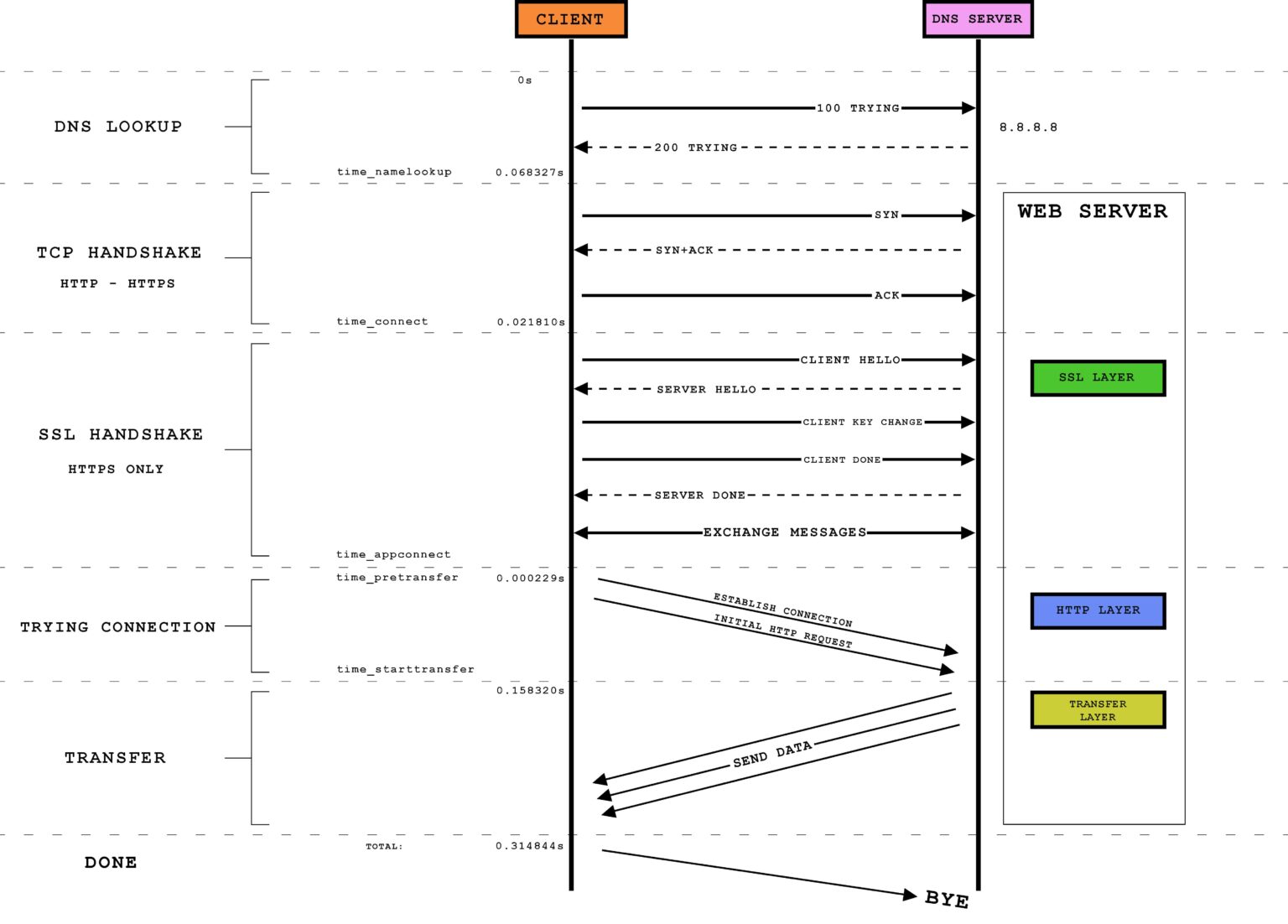
Legend:
time_namelookup: DNS lookuptime_connect: TCP handshaketime_appconnect: SSL handshaketime_redirect: redirect (-Lflag)time_pretransfer: an alias for either time_appconnect or time_connect (depending on HTTP or HTTPS). It is only useful as a delineator of when the specific request to the server has begun.time_starttransfer: when server is ready to deliver bytes. Same as TTFB (Time To First Byte). Includes time_pretransfer, just subtract time_pretransfer from the time_starttransfer to get the amount of time spent in this phasetime_total: Total time of the entire curl calldata transfer time:
time_total - time_starttransfer
Measure bandwidth
Approach: just download file of certain size and see how long it takes.
Notice the Average Dload column.
# Can use --proxy to measure proxy performance
curl \
    --proxy 'http://[216:dea:bee:dea:bee:dea:bee:dea]:8888' \
    -L -o /dev/null \
    http://speedtest.wdc01.softlayer.com/downloads/test500.zip
Alternative (via wget):
export http_proxy='http://[216:dea:bee:dea:bee:dea:bee:dea]:8888'
wget -q --show-progress --output-document=/dev/null \
    http://speedtest.wdc01.softlayer.com/downloads/test500.zip
Plotting download speed:
Create plot-curl-data.py file. Then:
# Download file while dumping progress to curl.out file
curl \
    -L -o /tmp/test500.zip \
    'http://speedtest.wdc01.softlayer.com/downloads/test500.zip' 2>&1 |\
tr '\r' '\n' |\
tee curl.out

python plot-curl-data.py curl.out

sxiv curl.out.png
Measure proxy latency:
curl \
    --proxy 'http://[216:dea:bee:dea:bee:dea:bee:dea]:8888' \
    -o /dev/null \
    -s -w 'Total: %{time_total}s\n' \
    https://www.google.com
Converting to Languages
# Export request to C
curl https://httpbin.org/anything --libcurl main.c
Other Tools
Exercises
# 1
curl https://httpbin.org
# 2
curl https://httpbin.org/anything
# 3
curl https://httpbin.org/anything -X POST
# 4
curl https://httpbin.org/anything -d 'value=panda'
# 5
curl www.google.com/robots.txt
# 6
curl https://httpbin.org/anything -H 'User-Agent: elephant'
# 7
curl https://httpbin.org/anything -X DELETE
# 8
curl https://httpbin.org/anything -i
# 9
curl https://httpbin.org/anything -X POST -d '{"value": "panda"}'
# 10
curl https://httpbin.org/anything -X POST -d '{"value": "panda"}' -H 'Content-Type: application/json'
# 11
curl https://httpbin.org/anything -H 'Accept-Encoding: gzip'
# 12
echo '{"value": "panda"}' > /tmp/my.json
curl https://httpbin.org/anything -X POST -d @/tmp/my.json
# 13
curl https://httpbin.org/image -H 'Accept: image/png' >/tmp/img.png
sxiv /tmp/img.png
curl https://httpbin.org/image -H 'Accept: image/jpeg' >/tmp/img.jpeg
sxiv /tmp/img.jpeg
# 14
curl https://httpbin.org/anything -X PUT
# 15
curl https://httpbin.org/image/jpeg >/tmp/img.jpeg
sxiv /tmp/img.jpeg
# 16
curl https://www.twitter.com/
curl https://www.twitter.com/ -i
curl https://www.twitter.com/ -L
# 17
curl https://httpbin.org/anything -H 'panda: elephant'
# 18
curl https://httpbin.org/status/404
curl https://httpbin.org/status/404 -i
curl https://httpbin.org/status/200
curl https://httpbin.org/status/200 -i
# 19
curl https://httpbin.org/anything -u username:password
# 20
curl https://twitter.com/ -H 'Accept-Language: es-ES' >/tmp/twitter.html
firefox /tmp/twitter.html
# 21
curl https://api.stripe.com/v1/charges -u sk_test_4eC39HqLyjWDarjtT1zdp7dc:
curl https://httpbin.org/anything -u sk_test_4eC39HqLyjWDarjtT1zdp7dc: