DNS
- Anatomy of a Linux DNS Lookup – Part I
https://zwischenzugs.com/2018/06/08/anatomy-of-a-linux-dns-lookup-part-i/
https://zwischenzugs.com/2018/06/18/anatomy-of-a-linux-dns-lookup-part-ii/
https://zwischenzugs.com/2018/07/06/anatomy-of-a-linux-dns-lookup-part-iii/
https://zwischenzugs.com/2018/08/06/anatomy-of-a-linux-dns-lookup-part-iv/
https://zwischenzugs.com/2018/09/13/anatomy-of-a-linux-dns-lookup-part-v-two-debug-nightmares/
https://doc.powerdns.com/authoritative/appendices/types.html
Online DNS Check Tools
Vocabulary
- Records
A: Points to IP address
AAAA: Same as A, but for IPv6
CNAME: Canonical Name Record. Points to alias (domain/subdomain name)
MX: Mail eXchange records; tells email delivery agents where to deliver mail
TXT: flexible Text records, for storing strings for a variety of uses
SOA: singular Start of Authority record kept at the top level of the domain. Contains specific required information about the domain, for example its primary name server
NS: The name servers associated with the domain
example.com= apex/root/naked domain name
Query
Browser --asks--> ISP DNS
Browser --asks--> ISP DNS --asks--> root server --returns list of TLD (e.g. .com) servers-->..
            ..--> ISP DNS --asks--> TLD server --returns the authoritative name server-->
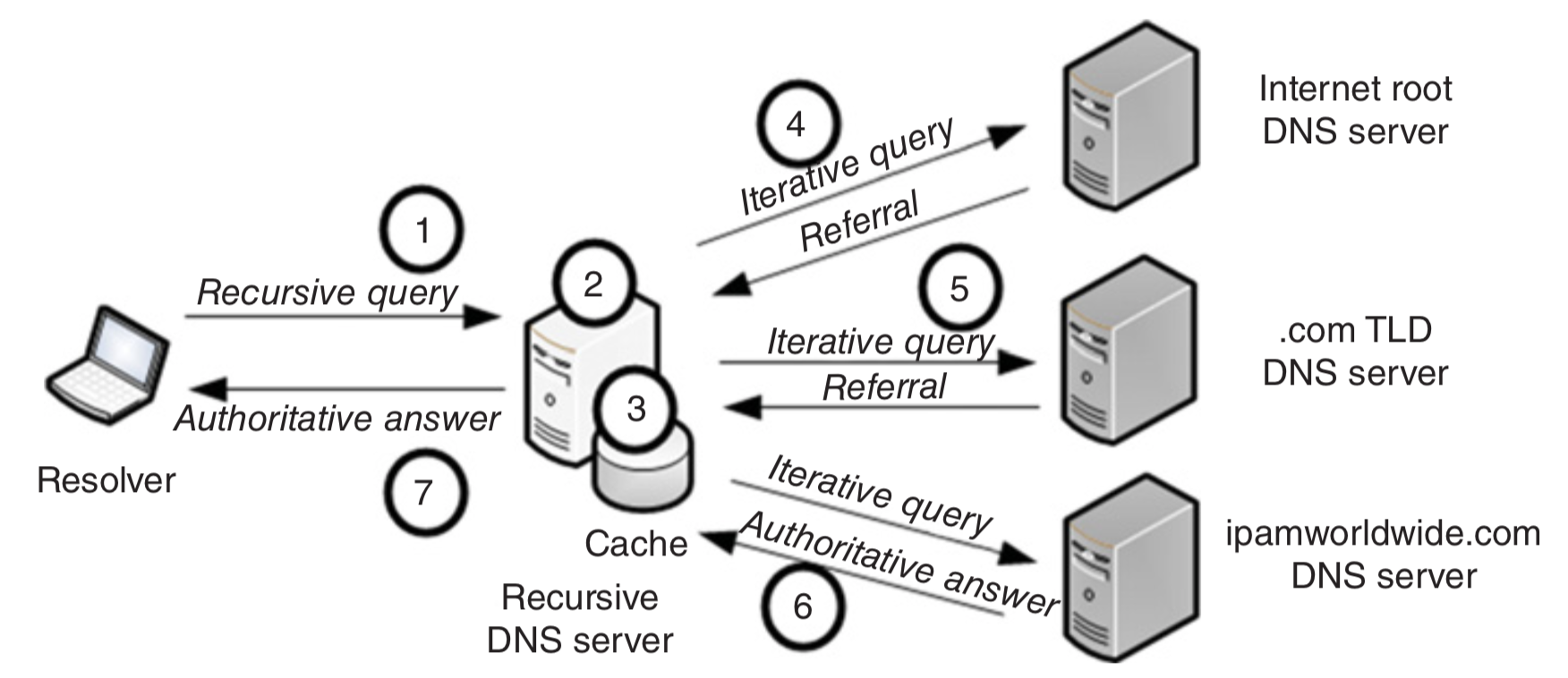
Root servers: {a..m}.root-servers.net.
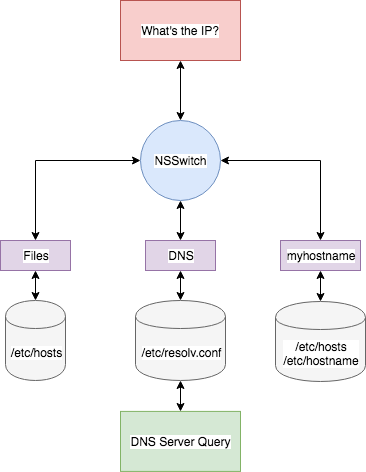
NSSwitch
Many programs use libc call getaddrinfo.
Example: ping uses nsswitch, while host doesn’t (but both read resolv.conf):
strace -f -e trace=open,openat \
    ping -c1 google.com 2>&1 >/dev/null |grep -z -e resolv.conf -e nsswitch

strace -f -e trace=open,openat \
    host google.com 2>&1 >/dev/null |grep -z -e resolv.conf -e nsswitch
Possible Issues
WWW Problem
A record:
A: www.example.com --> 123.123.123.123
A:     example.com --> 123.123.123.123
CNAME record:
CNAME: www.example.com --> example.com
A:         example.com --> 123.123.123.123
Scripting
use:
getent hosts example.com(is IPv6-first though)don’t:
host example.com(doesn’t respect nsswitch; not reliable output format)
Using dig
DNS Query Options
name: e.g
jvns.ca. Default is.query type: e.g.
AorCNAME. Default isADNS server: e.g.
@8.8.8.8. Default is whatever is in/etc/resolv.conf
Examples:
dig @8.8.8.8 jvns.cadig ns jvns.ca
Reverse DNS Lookup
$ dig -x 172.217.13.174
174.13.217.172.in-addr.arpa. 72888 IN   PTR yul03s04-in-f14.1e100.net.

# `-x 172.217.13.174` is a shortcut for
$ dig ptr 174.13.217.172.in-addr.arpa.
Formatting response
$ dig +noall +answer ns google.com
google.com.     158564  IN  NS  ns4.google.com.
...

$ dig +short ns google.com
ns2.google.com.
...

$ # Return behavior by default (if non-empty ~/.digrc)
$ dig +all jvns.ca
digrc
+noall +answer