Git
Sources:
- Config
Others, used:
https://dev.to/lydiahallie/cs-visualized-useful-git-commands-37p1
https://docs.gitlab.com/ee/topics/git/numerous_undo_possibilities_in_git/
https://git-scm.com/book/ru/v2/Ветвление-в-Git-Основы-ветвления-и-слияния
https://www.atlassian.com/git/tutorials/using-branches/merge-strategy
Learning Git from Novice to Expert: https://news.ycombinator.com/item?id=23149700
- TODO:
reflog
subrepo
global ignore: https://news.ycombinator.com/item?id=34498580
converting stash to a branch: https://news.ycombinator.com/item?id=34496395
- https://lobste.rs/s/fubpta/learn_use_email_with_git#c_ot9brp
Fun fact! Early versions of git rebase were essentially git format-patch | git am
References make commits reachable
Snippets
git pull == git fetch && git merge/rebase

git branch -f master HEAD~ == git switch master && git reset --soft HEAD~

git clone -b mybranch --single-branch git://sub.domain.com/repo.git

git pull --ff-only && git push

git push -u origin master

# Fix last commit message
git commit --amend -m "fixed message of last commit"

# Change last commit content
vim ...
git add ...
git commit --amend --no-edit

# Modify specific commit
git rebase --interactive 'bbc643cd^'  # -> `e`

# Clone github wiki (e.g. wiki of https://github.com/swaywm/sway/wiki)
git clone https://github.com/swaywm/sway.wiki

# Accept pull request
curl -sL https://github.com/nodejs/node/pull/37544.patch | git am

# Mirror repo to another server
git clone --bare https://github.com/exampleuser/old-repository.git
cd old-repository.git
git push --mirror https://github.com/exampleuser/new-repository.git

# Delete remote branch
git push origin --delete old-branch

# Add empty commit
# Use cases: Initial commit (easier rebase) and to trigger CI/CD build
git commit --allow-empty -m "Initial commit"
git commit --allow-empty -m "Zero diff"

# Securely backup and restore a git repo
tar -cvf archive.tar .git/ && gpg -c archive.tar
<transfer file>
gpg -d archive.tar.gpg > archive.tar && tar -xvf archive.tar
git reset --hard master

# Cat file contents
git show b3d85ad:./file.txt
git show origin/master:dir/f.txt > g.txt
git show branchA~10:fileA branchB^^:fileB

# Find to which branches the commit belongs
git branch -r --contains <commit>
git branch -a --contains <commit>

# Fix broken link
# src: https://stackoverflow.com/a/69639136
cp -r .git /tmp/.git_bak
git stash clear
git reflog expire --expire-unreachable=now --all
git gc --prune=now
Diff
How different are different diff algorithms in Git? - tl;dr: use
--histogramfor code changes

# Working Directory vs Stage
git diff
# Working Directory vs Tree
git diff ${tree}
# Stage vs Tree
git diff --cached ${tree:-HEAD}
# Tree vs Tree
git diff ${tree1} ${tree2}

# ... for a file
git diff ... -- <path>

# Compare two current folders
git diff --no-index dir1 dir2
# can use non-git diff: diff -r dir1 dir2

# List files that differ
git diff --name-only origin/master..origin/mybranch

# Compare file/folder F1 from branch B1
# with F2 from branch B2
git diff origin/B1:path/to/F1 origin/B2:path/to/F2

# From common ancestor of A and B, to B commit
git diff A...B
# same as
git diff $(git merge-base A B) B
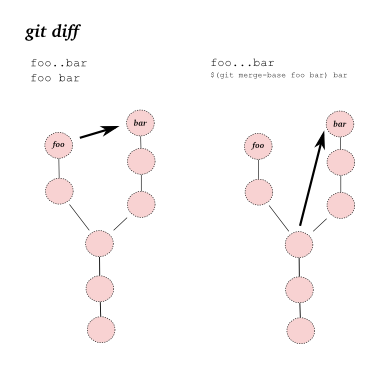
Diff Highlighters
Tag
# Create lighter tags (please don't)
git tag v1.4-lw

# Create annotated tags
git tag -a v1.4
git tag -a v1.4 -m "my version 1.4"
git tag -a v1.2 15027957951b64cf874c3557a0f3547bd83b3ff6
# Reassign a tag
git tag -a -f v1.4 15027957951b64cf874c3557a0f3547bd83b3ff6

# List tags
git tag
git tag -l '*-rc*'

# Push tags
git push origin v1.4
git push --tags

# Delete tag
git tag -d v1

# Describe commit relative to a tag
git describe
git describe HEAD~10
# Describe relative to a subcomponent tag (e.g. `subcomponent/v1.0.2`)
git describe --match='subcomponent/*'
Tag push permissions
git tag log and mkdir log creates ambiguety when git log test.
Advice: configure Git server to accept tag pushes only from release managers.
Naming
Advice: start tags with v, e.g. v1.0
Shell completion will work with v<Tab>,
while 1<Tab> will give you all commits with hash starting with 1.
Checkout
git checkout always copies items out of the index into the worktree.
https://stackoverflow.com/questions/44163307/why-does-git-checkout-branch-file-stage-the-change
Switch

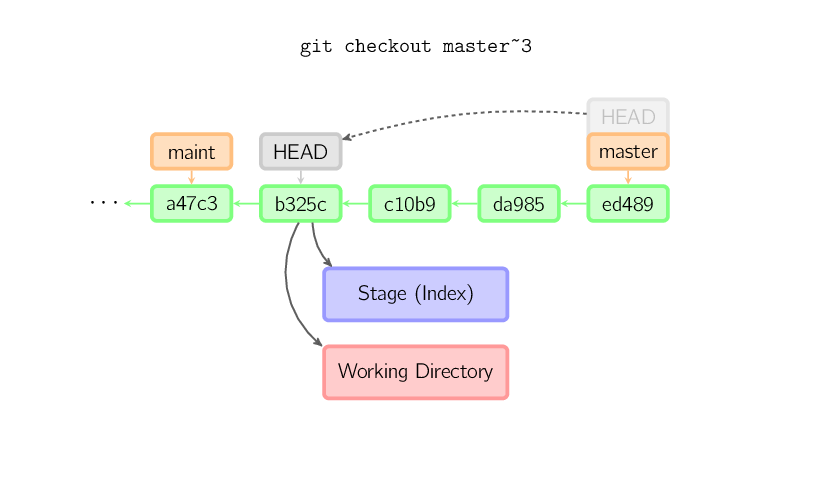
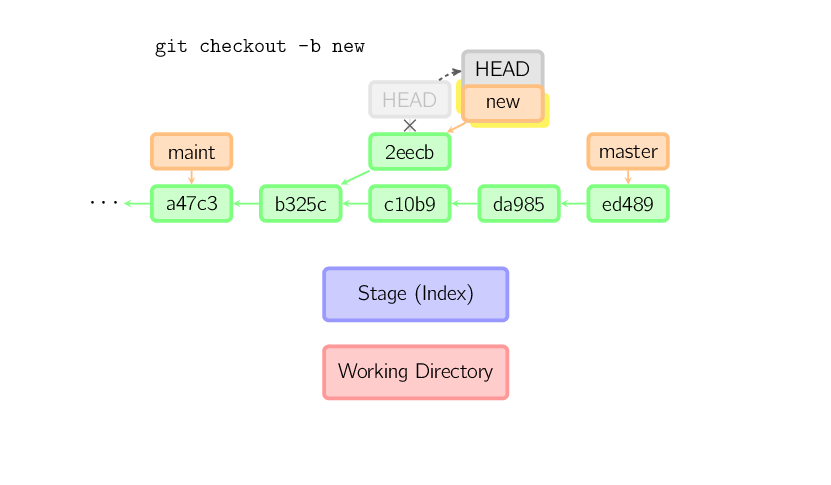
git switch featureX    == git checkout featureX
git switch -d 5bb9e4c  == git checkout 5bb9e4c
git switch -C featureX == git checkout -b featureX
git switch -           == git checkout -
                          git checkout @{-1}
Restore
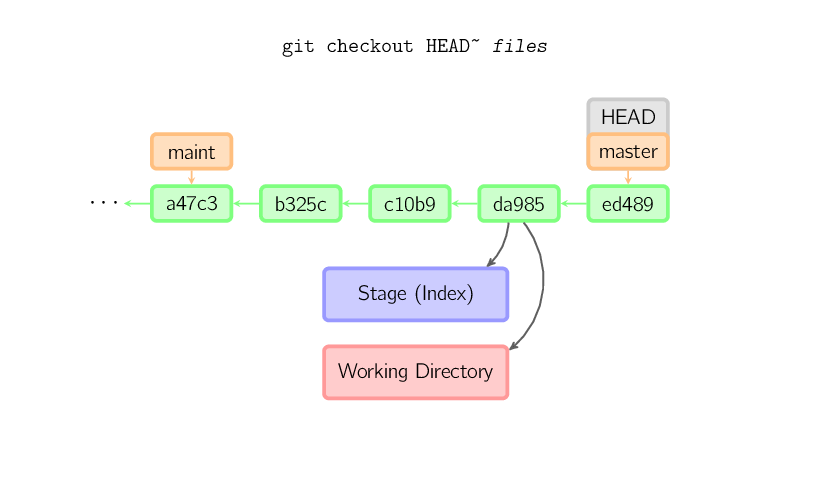
git restore [-s|--source <tree>] fileA.txt == git checkout [<tree>] fileA.txt

git restore one.txt two.txt  # Mention multiple files
git restore .                # Discard all local changes
git restore *.rb             # Wildcard option

git restore [-W|--worktree] [-S|--staged]
                  ^
                  \------ default choice

git restore [-p|--patch] fileA.txt
Reset
What’s the difference between “git reset” and “git checkout”?
https://git-scm.com/book/en/v2/Git-Tools-Reset-Demystified#_summary_8
Reset current HEAD to the specified state
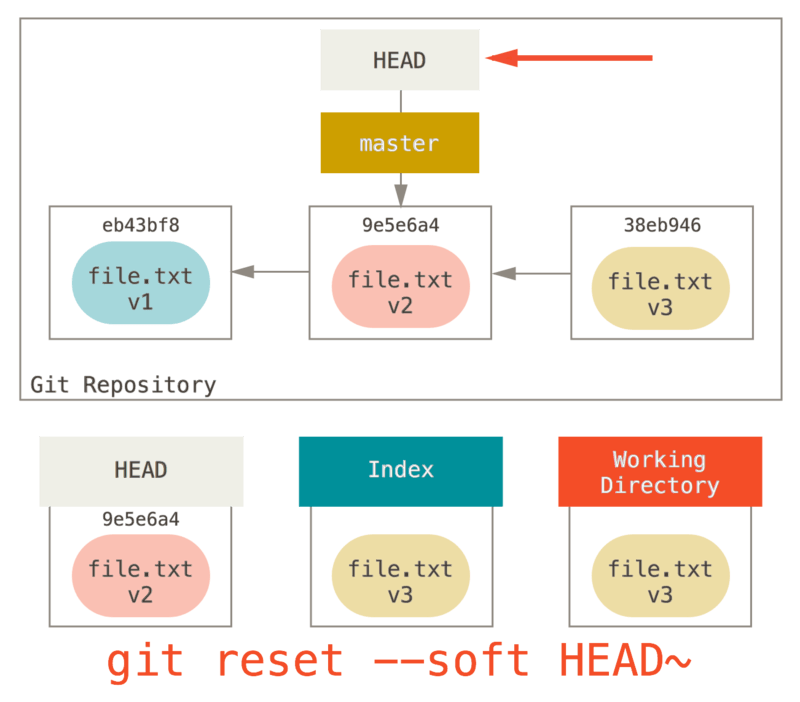
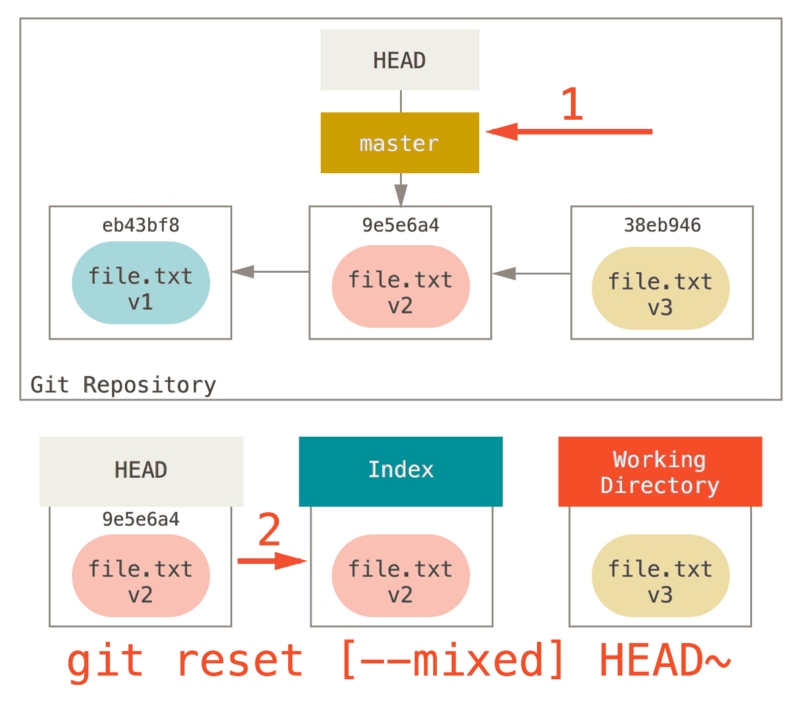
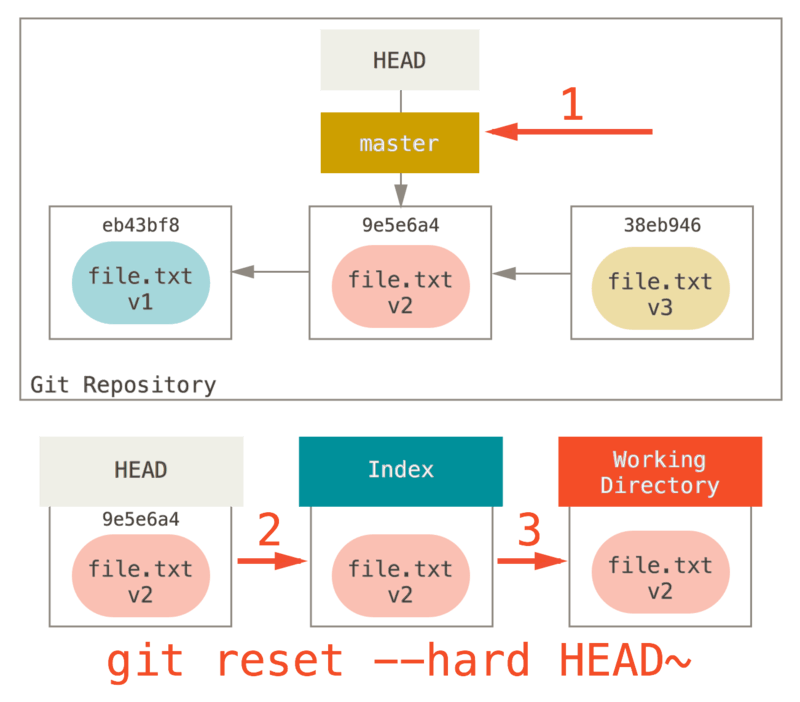
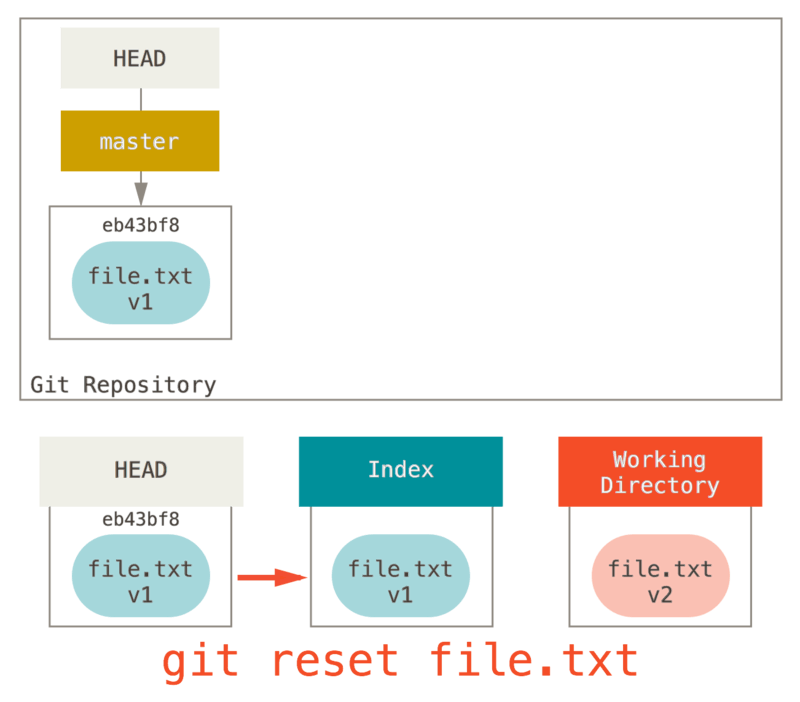

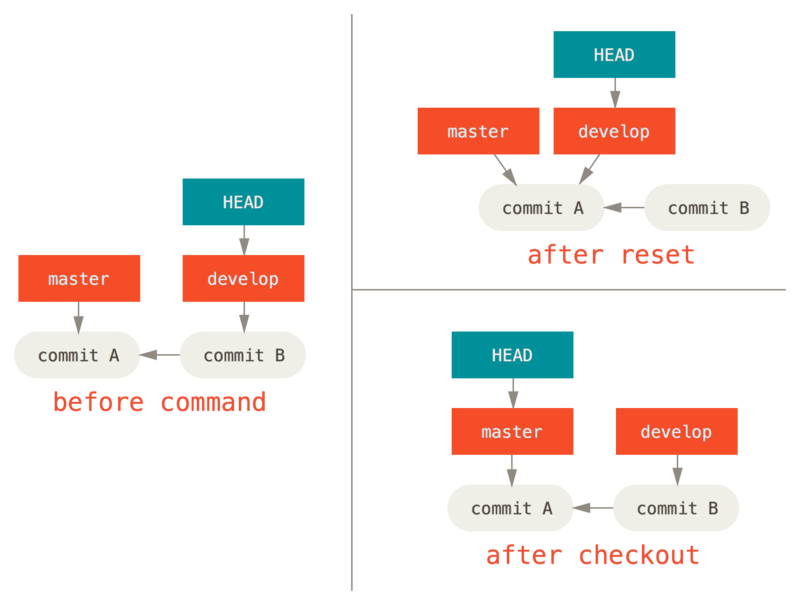
Command |
HEAD |
Index |
Workdir |
WD Safe? |
|---|---|---|---|---|
Commit Level |
||||
|
REF |
NO |
NO |
YES |
|
REF |
YES |
NO |
YES |
|
REF |
YES |
YES |
NO |
|
HEAD |
YES |
YES |
YES |
File Level |
||||
|
NO |
YES |
NO |
YES |
|
NO |
YES |
YES |
NO |
Stage 1. git reset --soft   Update HEAD
Stage 2. git reset --mixed  Update index
Stage 3. git reset --hard   Update working directory
Revert
# Revert multiple commits at once
git revert --no-commit commit-id-5
git revert --no-commit commit-id-4
git revert --no-commit commit-id-3
git revert --no-commit commit-id-2
git commit -m "The commit message"

git revert OLDER_COMMIT^..NEWER_COMMIT
# e.g. revert last two commits:
git revert --no-commit HEAD~2..HEAD
git revert --no-commit HEAD~2..      # same as above
Rebase and Cherry Pick
https://andrewlock.net/working-with-stacked-branches-in-git-is-easier-with-update-refs/
https://www.viget.com/articles/the-new-git-option-for-rebasing-multiple-branches-at-once/
Rebase

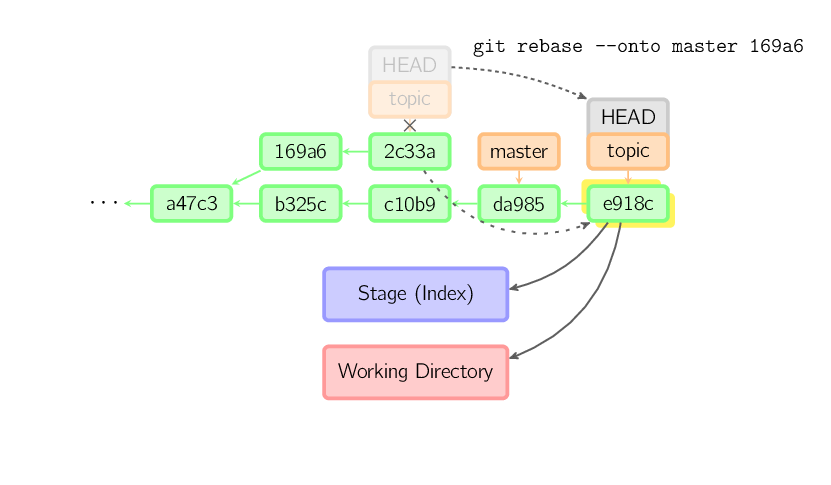
# Rebase featureX on master
git rebase master featureX == git switch featureX && git rebase master
git rebase --continue

git rebase [--onto <newparent>] [<oldparent> [<until>]]

# Start rebase from (but not including) commit 169a6
git rebase --onto master 169a6

git rebase --interactive
git rebase --onto F D
git rebase --onto F D my-branch

Before                                    After
A---B---C---F---G (branch)                A---B---C---F---G (branch)
         \                                             \
          D---E---H---I (HEAD my-branch)                E'---H'---I' (HEAD my-branch)
git rebase --onto F D I
git rebase --onto F D HEAD

Before                                    After
A---B---C---F---G (branch)                A---B---C---F---G (branch)
         \                                        |    \
          D---E---H---I (HEAD my-branch)          |     E'---H'---I' (HEAD)
                                                   \
                                                    D---E---H---I (my-branch)
git rebase --onto F D H
git rebase --onto F D HEAD^
git rebase --onto F D HEAD~
git rebase --onto F D HEAD~1

Before                                    After
A---B---C---F---G (branch)                A---B---C---F---G (branch)
         \                                        |    \
          D---E---H---I (HEAD my-branch)          |     E'---H' (HEAD)
                                                   \
                                                    D---E---H---I (my-branch)
git rebase master feature-2
git rebase --update-refs master feature-2

Before                    After (with --update-refs)      After (no --update-refs)
A---B---C (master)       A---B---C (master)             A---B---C (master)
     \                            \                          \   \
      D---E (feature-2)            D'---E' (feature-2)        D   D'---E' (feature-2)
       \                            \                          \
        (feature-1)                  (feature-1)                (feature-1)
Cherry pick
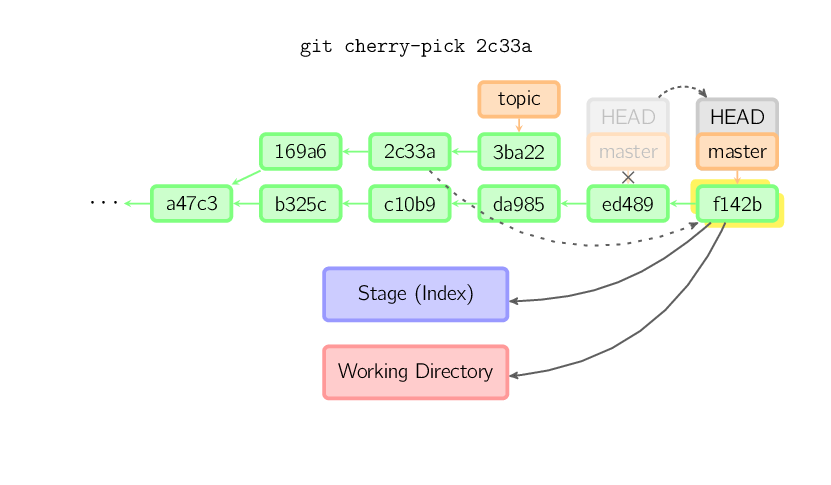
git cherry-pick 2c33a
git cherry-pick -x 2c33a  # add "(cherry picked from commit ...)" message
git-revise
A better git rebase -i
# Interactive revise non-published commits in current branch
git revise -i
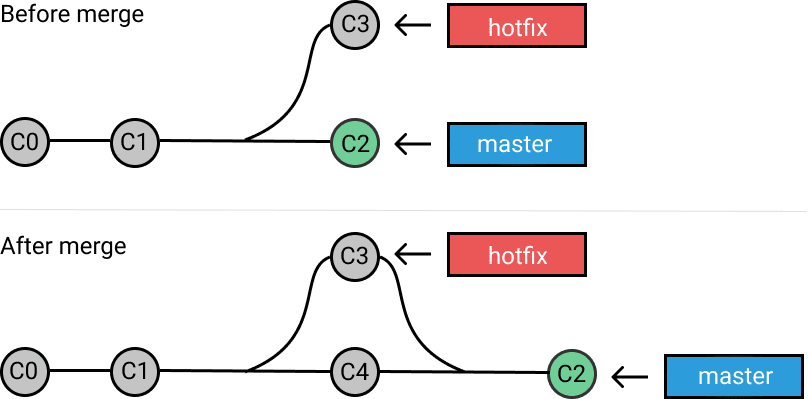
Merge
git merge master feature == git checkout master && git merge feature

Stash
# Save
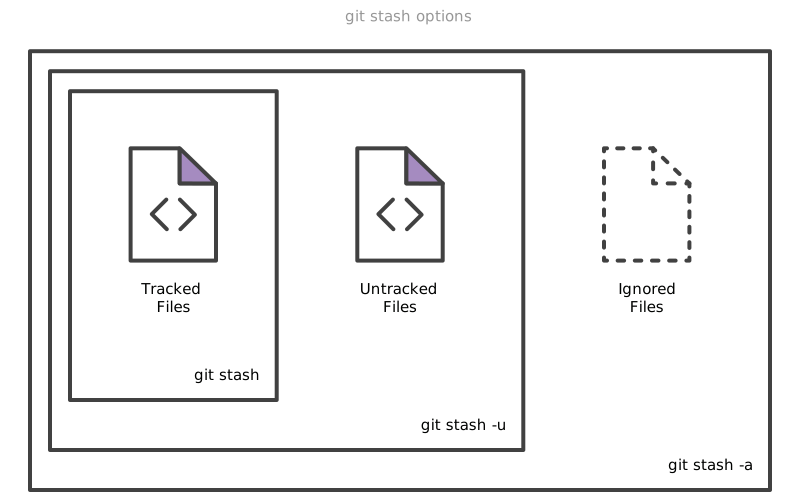
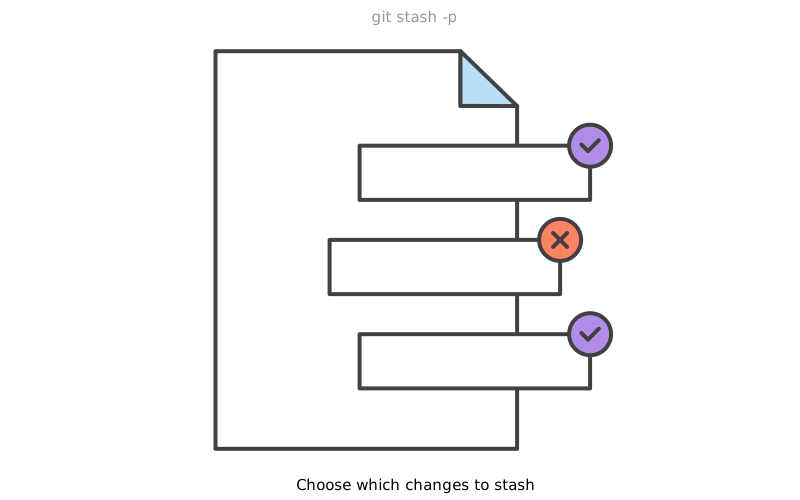
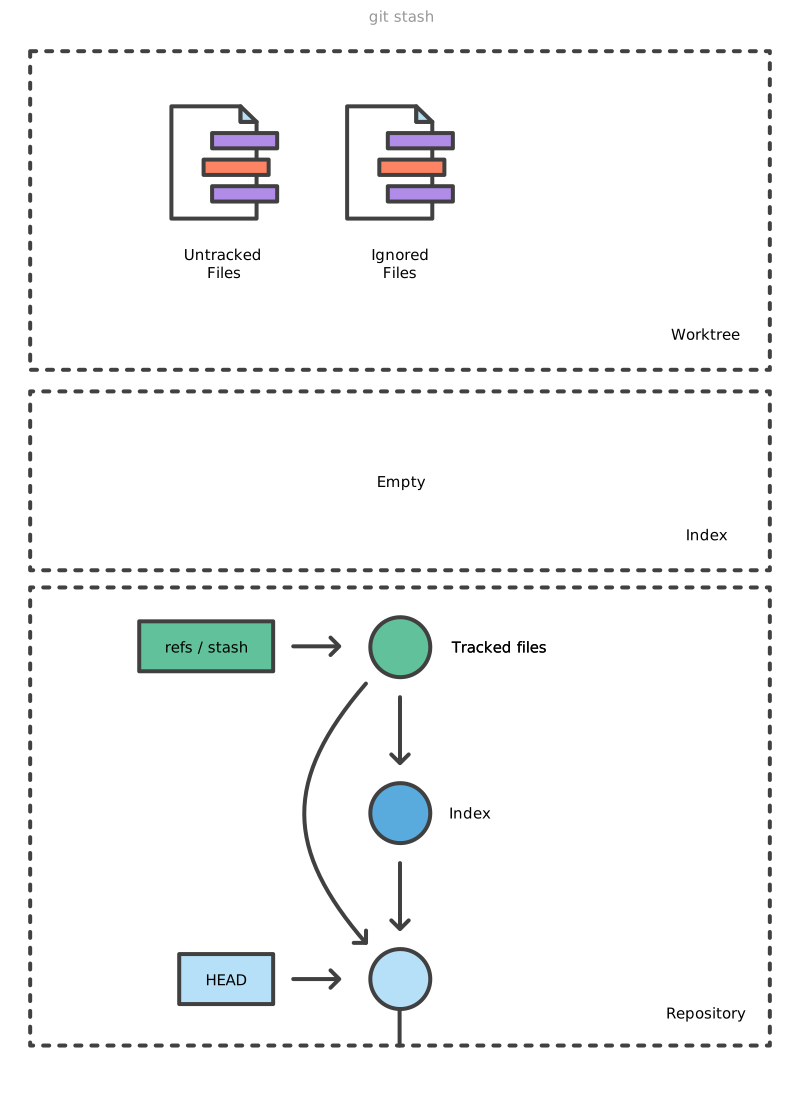
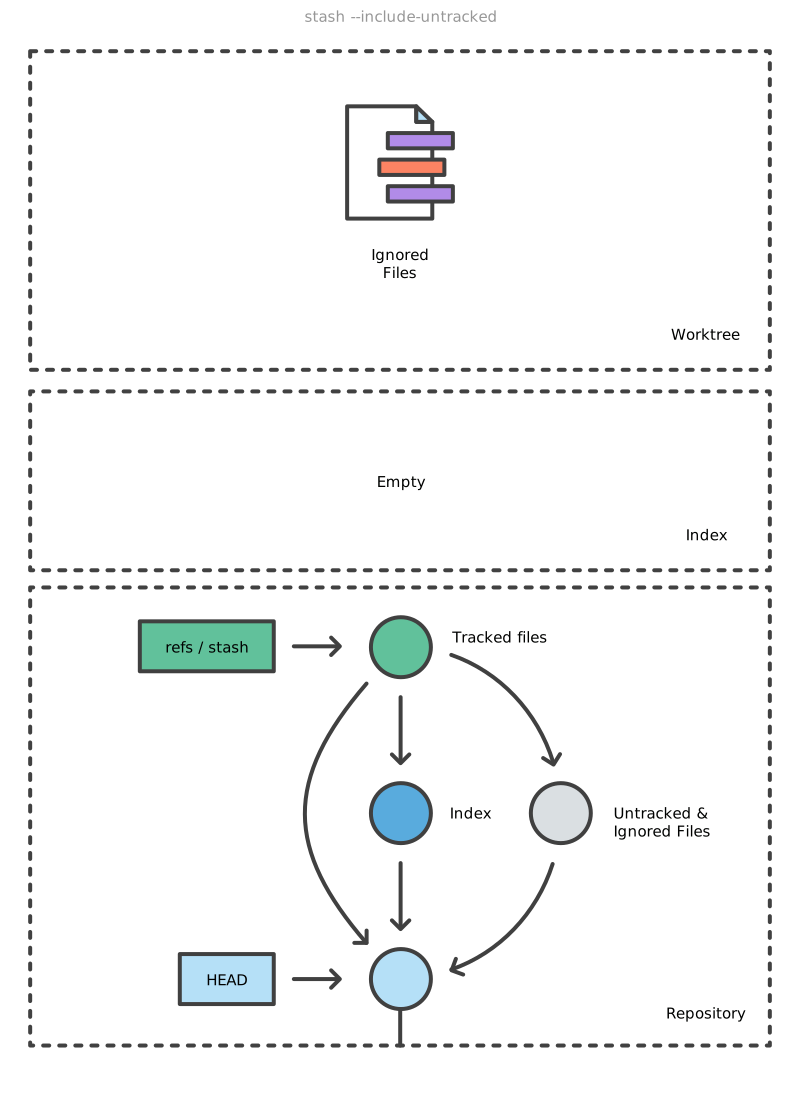
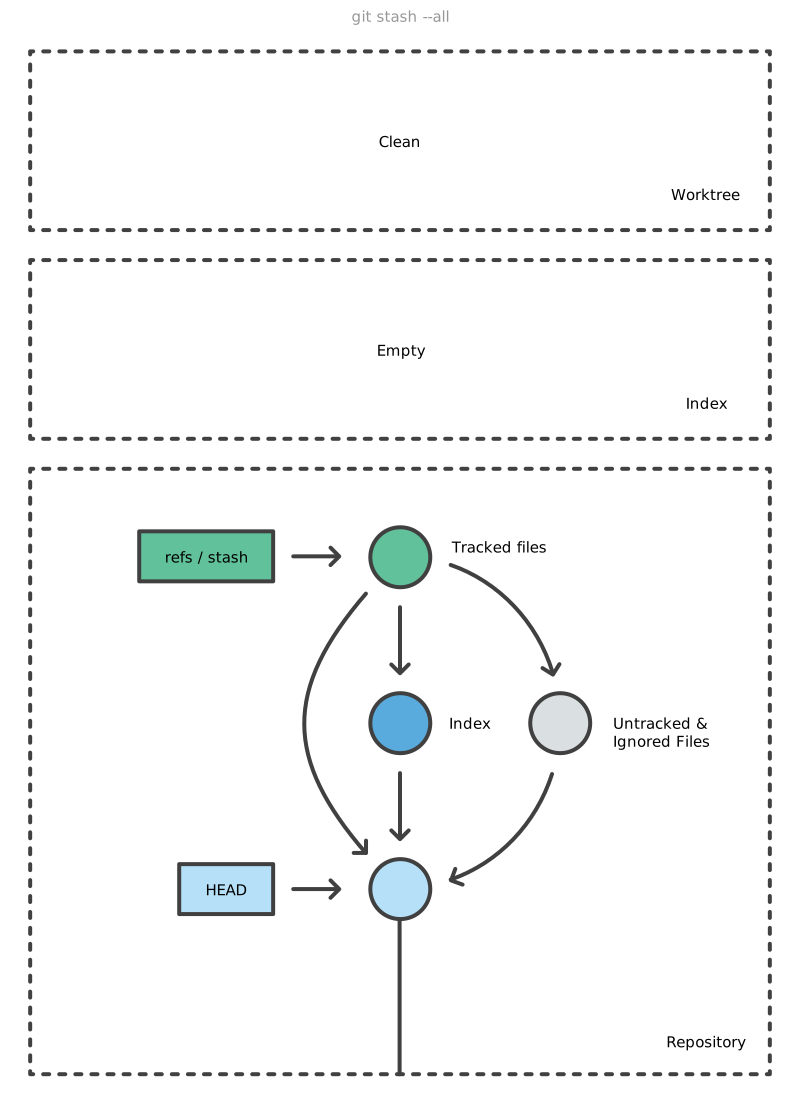
git stash [-u|--include-untracked] [-a|--all]
git stash push -m "add style to our site" == git stash save "add style to our site"
# Save specific files
git stash push -m <message> <path-of-file1> <path-of-file2>
# Save, including untracked files
git stash --include-untracked
# Save, including untracked and ignored
git stash --all

# Apply a stash
git stash apply
# Same, but throws applied stash away then
git stash pop
git stash pop 2 == git stash pop stash@{2}

# Checkout single file
git restore -s 'stash@{0}' -SW sqlite-history.zsh
# Create copy of stashed file under different name
git show stash@{0}:stashed_file.rb > copy_of_stashed_file.rb

# In case of conflict
git restore --staged <conflicting-file>

git stash list
git stash show [-p|--patch] [<n>]

git stash drop
git stash clear
Blame and Bisect
Blame
git blame -L 12,22 products.php
git blame -L 12,22 -C products.php

# Ignore whitespace
# or: git config --local blame.ignoreRevsFile ignorerevs
git blame -w
Bisect
# Start
# from
git bisect start
git bisect bad
# to
git bisect good HEAD~10
# ... check if the state
# and set it:
git bisect [good|bad]

# To initial state
git bisect reset

# Another example:
# git bisect start <bad> <good>
git bisect start linux-next/master v2.6.26-rc8
# find where make fails
git bisect run make kernel/fork.o
Conflicts Resolving
Ours and Theirs
us/ours- currentHEADat the moment of conflict (not necessarilyHEADat the moment of writing the command)them/theirs- the other commit
merge (intuitive)
# merge feature into master
git switch master
git merge feature

#   us/ours   = HEAD = master
# them/theirs =        feature
cherry-pick (intuitive)
# apply A to feature
git switch feature
git cherry-pick A

#   us/ours   = HEAD = feature
# them/theirs =        A
rebase (counter-intuitive)
# rebase feature onto latest master
git switch feature
git rebase master
checkouts
m2(ours), cherry-picksf1(theirs)checkouts
f1'(ours), cherry-picksf2(theirs)
                                                 f2'  <-- feature'
                                                /
m2  <-- master               master -->  m2--f1'
|                                        |
m1    f2 <-- feature                     m1
|    /                                   |
o--f1                                    o
|                                        |
revert (sort of intuitive)
xxx
Merging example
git switch master
git merge feature
# conflict

# resolve manulally. OR:
git restore --ours   codefile.js  # to select the changes done in master
git restore --theirs codefile.js  # to select the changes done in feature

# continue merge
git add codefile.js
git merge --continue
Rebasing example
git switch feature
git rebase master
# conflict

git restore --ours   codefile.js  # to select the changes done in master
git restore --theirs codefile.js  # to select the changes done in feature

# continue rebase
git add codefile.js
git rebase --continue
Stacked Git
http://events17.linuxfoundation.org/sites/events/files/slides/An Introduction to Stacked Git.pdf
Logs
# Print refs: HEAD/branches/tags (defaults to --decorate=short)
git log --decorate

# One commit is one line + short hashes
git log --oneline
git log --pretty=oneline --abbrev-commit

# Useful snippet
git log --graph --oneline --all
# Third-party alternative
git-foresta --style=10 --all |less -RSX

# Local changes, not yet pushed to remote
git log origin/mybranch..HEAD
git log @{u}..HEAD

# Filtering
# by date
git log --after=2021-07-01 --before=2021-07-25
git log --after=2021-07-01 --before=yesterday
git log --after=2021-07-01 --before=25
git log --since=2021-07-01 --until=25
# by author
git log --author=Lain           # grep-like expression
git log --author='Lain\|Arisu'
# by commit message
git log --grep='bug'
# by file
git log -- foo.py bar.py
# pickaxe: search by added/removed source code
git log -S"Hello, World!"
git log -G"bug|fix"
# by merge (by defaults includes merge commits)
git log --no-merges  # no merge commits
git log --merges     # only merge commmits
# by range
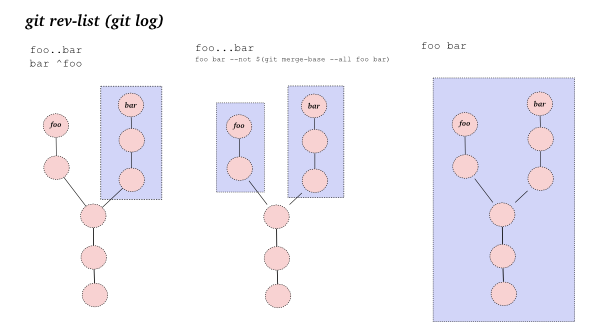
git log ..
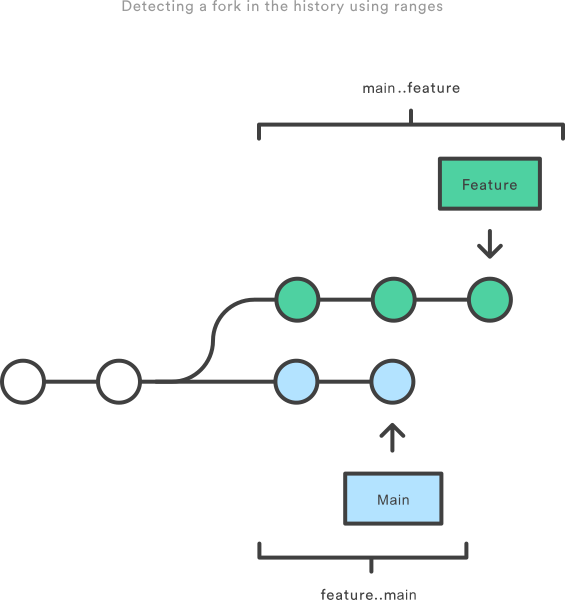
git log master..feature  # git log <not here>..<here>

# List files affected by commits
git whatchanged --since="1 week ago" --oneline
Submodule and subtree
Submodule
https://longair.net/blog/2010/06/02/git-submodules-explained/
https://chrisjean.com/git-submodules-adding-using-removing-and-updating/ (2009, deprecated)
https://stackoverflow.com/questions/1260748/how-do-i-remove-a-submodule
# Initialize and clone submodules on fresh-cloned repository
git submodule update --init == git submodule init && git submodule update
# or, clone with submodules
git clone --recursive ...
# or
git pull --recurse-submodules

# After moving HEAD (pull/switch),
# the submodule is not updated automatically
git submodule status
git submodule update

# pull submodule from remote
git submodule update --remote

# Add new submodule
git submodule add git://git.mysociety.org/plugin plugin
Change submodule remote:
cd plugin
git remote rm origin
git remote add origin git@github.com:lainiwa/plugin.git
git remote -v

git config branch.master.remote origin
git config branch.master.merge refs/heads/master

git config --list |grep '^submodule'
git config --list |grep '^branch'
Remove submodule:
# Clear `lib/plugin` and entry in the local `.git/config`
git submodule deinit lib/plugin
# Remove filetree at `lib/plugin` and entry in the `.gitmodules`
git rm lib/plugin

# or

# See above
git rm lib/plugin
# Remove gitdir repo and record from local `.git/config`
rm -rf .git/modules/lib/plugin
git config --remove-section submodule.lib/plugin
Subtree
Git UIs
GitWeb
An 8к Perl CGI script.
Configure to bind to localhost, and be served with python:
[instaweb]
    local = true
    httpd = python
Run:
git instaweb         # runs on http://localhost:1234
git instaweb --stop
Tig TUI
Switching views
[m]ain[s]tatus[t]ree[y] stash[g]rep[h]elp
Status view
[u] Stage/unstage file or chunk[!] Revert file or chunk[C]ommit[M]erge[1] Stage line[[] / []] Increase/decrease the diff context
Tig
Worktree
https://dzone.com/articles/a-2016-git-retrospective-worktrees
https://stackoverflow.com/questions/42457470/storage-efficient-of-a-git-clone
https://dev-notes.eu/2022/06/Branch-Management-With-Git-Worktree/
git clone https://github.com/cmus/cmus && cd cmus

# Add worktree ../cmus-hotfix, and create branch cmus-hotfix
git worktree add ../cmus-hotfix

# or: add worktree, and create branch hotfix
git worktree add -b hotfix ../cmus-hotfix

# Add worktree for existing branch
git worktree add ../cmus-dev dev
Remote
# Change remote url
git remote set-url origin https://github.com/OWNER/REPOSITORY.git
Notes
# Simple example
git notes add -m 'Acked-by: lainiwa'
git log  # will show Notes after the comment
git notes remove [commit-id]

# Add and append
git notes add -m "message" [commit-id]
git notes append -m "message" [commit-id]

# Use with Gerrit reviewnotes plugin
git fetch origin refs/notes/review:refs/notes/review
git log --notes=review

# Namespaces (default namespace is `commits`)
git notes --ref jenkins add "build pass"
git notes --ref jenkins show HEAD
git log --show-notes=jenkins
git log --show-notes="*"

# Copy notes to between commits
git notes copy commitA commitB

# Viewing
git log --notes=review
git notes show

# Pushing and pulling
git push origin refs/notes/commits
git push origin "refs/notes/*"
git fetch origin refs/notes/commits:refs/notes/commits
git fetch origin "refs/notes/*:refs/notes/*"
Use cases:
Code review and tests results
Time tracking
Linking to external resources
Annex
google:
"git annex init" tutorial -"man page" -manpage -manpages -dataladhttps://docs.hetzner.com/robot/storage-box/access/access-webdav
https://git-annex.branchable.com/tips/centralized_git_repository_tutorial/
https://git-annex.branchable.com/tips/peer_to_peer_network_with_tor/
https://github.com/jhamrick/git-annex-tutorial/blob/master/Tutorial%20on%20git-annex.ipynb
https://www.thomas-krenn.com/en/wiki/Git-annex_detailed_information
https://gist.github.com/rmi1974/08ff06eeca729bbd0a8e3c4d8e1adafd
https://git-annex.branchable.com/forum/How_to_delete_a_remote__63__/
https://git-annex.branchable.com/tips/a_gui_for_metadata_operations/
https://git-annex.branchable.com/tips/disabling_a_special_remote/
https://git-annex.branchable.com/tips/git-annex_extensions_for_ranger__44___the_file_manager/
https://git-annex.branchable.com/tips/Repositories_with_large_number_of_files/
https://git-annex.branchable.com/tips/using_signed_git_commits/
https://git-annex.branchable.com/tips/what_to_do_when_you_lose_a_repository/
https://git-annex.branchable.com/walkthrough/automatically_managing_content/
https://git-annex.branchable.com/walkthrough/fsck__58___verifying_your_data/
https://www.thomas-krenn.com/en/wiki/Git-annex_Repository_on_an_External_Hard_Drive
- https://git-annex.branchable.com/git-annex-copy/
--from=remote1 --to=remote2
https://cheatography.com/babobba/cheat-sheets/git-annex/ https://scicomp.aalto.fi/scicomp/git-annex/ https://swan.physics.wsu.edu/forbes/draft/git-annex/ https://oldwiki.scinet.utoronto.ca/images/5/55/Snug-git-annex.pdf https://tylercipriani.com/blog/2015/05/13/git-annex/ https://temofeev.ru/info/articles/organizatsiya-raspredelyennogo-khraneniya-faylov-s-pomoshchyu-git-annex/ https://blog.debiania.in.ua/posts/2013-12-15-advertising-git-annex.html https://superuser.com/questions/564381/moving-two-existing-already-synced-directory-trees-to-git-annex https://anarc.at/hardware/phone/htc-one-s/
Snippets
# Init local repo
git init
git annex init

# Add a file
dd if=/dev/zero of=file_100M bs=1M count=100
git annex add file_100M

# Show remotes-x-files matrix (what where is being stored)
git annex list
# Sync files with remote
git annex sync hetzner --content

# Annex might leave many git objects
git gc && git repack -Ad && git prune

# Ncdu the local repo
ncdu --exclude .git --follow-symlinks
Internals
# List files in `git-annex` brach
git ls-tree -r git-annex |grep -v '/SHA256E-'
# Cat those files' content
git show git-annex:remote.log
Adding remotes
https://git-annex.branchable.com/forum/Sync_files_from_remote_to_remote/
# Add a special remote: WebDav on hetzner storage box
WEBDAV_USERNAME='u123456' \
WEBDAV_PASSWORD='passwordGoesHere' \
git annex initremote hetzner type=webdav \
  url=https://u123456.your-storagebox.de/annex \
  encryption=none

# Add a special remote: WebDav on hetzner storage box (encrypted)
# (30% slower than unencrypted WebDav sync)
WEBDAV_USERNAME='u123456' \
WEBDAV_PASSWORD='passwordGoesHere' \
git annex initremote hetzner-secret type=webdav \
  url=https://u123456.your-storagebox.de/annex-encrypted \
  encryption=hybrid keyid=$GPG_KEY_OR_EMAIL

# Mounting sshfs is too slow
# Use git-annex-remote-rclone instead
# (30% slower than unencrypted WebDav sync)
git annex initremote hetzner-sftp type=external \
    externaltype=rclone target=hetzner-sftp prefix=git-annex \
    encryption=shared rclone_layout=lower

# Add a special remote: S3 on Wasabi (encrypted)
AWS_ACCESS_KEY_ID='123456789ABCDEFGHIJK' \
AWS_SECRET_ACCESS_KEY='123456789abcdefghijklmnopqrstuvwxyz01234' \
git annex initremote wasabi-secret type=S3 \
  host=s3.eu-central-1.wasabisys.com \
  encryption=hybrid keyid=$GPG_KEY_OR_EMAIL

AWS_ACCESS_KEY_ID='123456789ABCDEFGHIJK' \
AWS_SECRET_ACCESS_KEY='123456789abcdefghijklmnopqrstuvwxyz01234' \
git annex initremote wasabi-secret type=S3 \
    host='s3.eu-central-1.wasabisys.com' bucket=lainiwa-annex \
    encryption=hybrid keyid=$GPG_KEY_OR_EMAIL
Cloning Repository
git clone <repo>
git annex init "temporary folder"

WEBDAV_USERNAME='u123456' \
WEBDAV_PASSWORD='passwordGoesHere' \
git annex enableremote hetzner

git annex get -- <file>
Config
# Open git annex config in text editor
git annex vicfg

# Set numcopies and mincopies
git annex numcopies 2
git annex numcopies 1  # excessive: defaults to 1 anyway
Requred and Preferred Content
https://git-annex.branchable.com/preferred_content/standard_groups/
https://git-annex.branchable.com/git-annex-preferred-content/
- https://git-annex.branchable.com/git-annex-groupwanted/
important
standard vs groupwanted ??
# Set wasabi remote to prefer to store everything
git annex group wasabi backup
git annex wanted wasabi groupwanted
# same for hetzner remote
git annex group hetzner backup
git annex wanted hetzner groupwanted

# Set `here` to store only some files
git annex wanted . "(include=documents/* or include=imgs/screenshots/*_2023.* or include=imgs/screenshots/*_2024.* or include=imgs/screenshots/*.txt or include=imgs/photos/IMG_2023* or include=imgs/photos/IMG_2024*) and exclude=imgs/photos/*.mp4 and exclude=documents/medical/*/*.tar.xz and exclude=documents/medical/*/*"

# Edit config file in $EDITOR
git annex vicfg

# When set, you can do these
git annex drop --auto
git annex get --auto
# or
git annex sync --content
Attributes
# Require at least two copies of each file
git annex numcopies 2
# and send each file to usbdrive
git annex copy . --to usbdrive

# Redefine numcopies for certain files
echo "*.ogg annex.numcopies=1" >> .gitattributes
echo "*.flac annex.numcopies=3" >> .gitattributes

# Same, but per folder approach
mkdir important_stuff
echo "* annex.numcopies=3" > important_stuff/.gitattributes
Deleting files
git rm file_100M file_1M

# Show locally unused files
git annex unused
# Drop locally unused files
git annex dropunused 1-2

# Same, but for remote
git annex unused --from hetzner
# Will fail unless --force is provided (because numcopies defaults to 1)
git annex dropunused --from hetzner 1-2
Matching and finding files
# Find files that are one one remote but not on the other
git annex find --in=hetzner --and --not --in=wasabi \
          --or --in=wasabi --and --not --in=hetzner

# Find files that are stored locally but not on remote
git annex find --in=here --and --not --in=hetzner
Moving files around
Alternatives
https://github.com/arxanas/git-branchless/wiki/Related-tools
- https://news.ycombinator.com/item?id=29942796
Seems to focus on building data pipelines
Instead of “sparse index” it can fetch files related to a “pipeline”
Bundle
PGP & SSH
https://www.kernel.org/doc/html/latest/process/maintainer-pgp-guide.html
https://people.kernel.org/monsieuricon/what-does-a-pgp-signature-on-a-git-commit-prove
https://github.com/lfit/itpol/blob/master/protecting-code-integrity.md
https://docs.gitlab.com/ee/user/project/repository/signed_commits/ssh.html
# Show info on tag
git cat-file -p v5.8-rc7
    #--> object 92ed30...
    #--> type commit
    #--> ...
# Show info on tagged commit
git cat-file -p 92ed30

# Verify tag
git verify-tag    v5.8-rc7
git verify-commit v5.8-rc7
Hooks
Clean
# Clean untracked files (like a `rm *`)
git clean -f|--force
# Recursive clean of untracked files (like a `rm -r *`)
git clean -fd

#
git clean ... [-n|--dry-run]
Refs
Local branches are storead in .git/refs/heads/.
Remote branches - in .git/refs/remotes/origin
(the remote, as created by git clone, default name is origin).
Example config, as created by git clone (without the --single-branch flag):
$ git config --local --list

remote.origin.url=https://github.com/<git_username>/my_repo.git
remote.origin.fetch=+refs/heads/*:refs/remotes/origin/*
branch.master.remote=origin
branch.master.merge=refs/heads/master
Reflog
Ignoring
.gitignore
Shared gitignore.
.git/info/exclude
Personal (local) gitignore.
Examples
Create and use a local remote
git init --bare ~/projects/remotes/test.git
mkcd ~/projects/test && git init
git remote add origin ~/projects/remotes/test.git
git push origin master
git clone ~/projects/remotes/test.git test1
Sync a fork
git remote add upstream https://github.com/larkery/zsh-histdb.git
# git remote -v
git fetch upstream
# git branch --all
# <merge/rebase here>
Unfuckup the master branch
# Get the lastest state of origin
git fetch origin
git checkout master
git reset --hard origin/master
# Delete untracked
git clean -fd
Practices
The Problem with Git Flow: https://news.ycombinator.com/item?id=23622071
https://medium.com/@kentbeck_7670/test-commit-revert-870bbd756864
- My unorthodox, branchless git workflow
Author uses
git push origin HEAD~5:refs/heads/masterto push changesSame as
git push origin HEAD~5:master
Merge vs Rebase
Commit Messages
Filer-repo
How to Use Git-Filter-Repo to Remove Files From Your Git Repository
Cheat Sheet: Conversion of Examples from the filter-branch manpage
https://blog.gitguardian.com/rewriting-git-history-cheatsheet/
https://marcofranssen.nl/remove-files-from-git-history-using-git-filter-repo
# Remove file(s) from the repo
# without `--invert-paths` it will unuke everything but the `Templates/`
git filter-repo --invert-paths --path Templates/
git push origin --tags

# Remove big files
git filter-repo --strip-blobs-bigger-than 10M
git push origin --force 'refs/heads/*'    # Overwrite all branches
git push origin --force 'refs/tags/*'     # Remove large files from tagged releases
git push origin --force 'refs/replace/*'  # Prevent dead links (created by git filter-repo)

# Change one word in all commits
FILTER_BRANCH_SQUELCH_WARNING=1 \
git filter-branch -f --tree-filter "sed -e 's#shit#flower#g' -i *.txt" 685966d6..HEAD
Git attributes
# Override attribute to unspecified state
# (negative patterns are forbidden)
Foo*    attr1=value1 attr2=value2
*.meta  !attr1

# Ignore all test and documentation with "export-ignore"
# Omit this files when downloading ZIP on github
.gitattributes export-ignore
.gitignore     export-ignore
/docs          export-ignore
/tests         export-ignore

# Set files as either text or binary
# by extension
* text=auto
*.php text
*.png binary
*.jpg binary

# Conserve a CRLF-ending file
tests/newline/CRLF.php text eol=crl

# Set a default for when conflicts appear: default, ours, theirs
# I prefer -diff for mistakes prevention
yarn.lock         merge=ours
package-lock.json merge=ours

# Do not try merge these files
composer.lock          -diff
yarn.lock              -diff
public/build/js/*.js   -diff
public/build/css/*.css -diff
*.map                  -diff
rev-manifest.json      -diff

# Remove compiled assets from github statistics
public/build/css/*.css linguist-vendored
public/build/js/*      linguist-vendored
public/build/font/*    linguist-vendored
Extensions
Git DVC
mkcd tstdvc

git init
dvc init
git status
git commit -m "Initialize DVC"

dvc remote add -d myremote /tmp/dvcstore
Git Bug
git bug user create
git bug add
git bug ls
git bug push
git bug termui
git bug webui
Internals
https://github.blog/2022-09-13-scaling-gits-garbage-collection/
https://github.blog/2022-08-29-gits-database-internals-i-packed-object-store/
https://codewords.recurse.com/issues/two/git-from-the-inside-out
# A todo inside .git directory
vim .git/todo

# Create and use a draft commit message
vim .git/draft
git commit -eF .git/draft